
Independent Verification for sensitive communication
Don’t trust the channel. Verify the communication. Verify before you act.
Give recipients, partners, and connected systems a way to verify sensitive messages, files, requests, and workflow updates before they act: issuer, purpose, time, message match, attachment match, and trace status. Verify sensitive communication before you reply, pay, approve, or act.
Proof without surveillance. TraceProof stores proof metadata, not raw conversations. It supports public and private traces, protected message and attachment checks, API integrations, and operator-led tools such as Gmail and Outlook.
Verified sensitive communication
Trace Verified
Q7M4K2PR
Public trace
Message + attachment protected
Declared communication context
Customer support workflow · Message and attachment proof available
Verify before acting
Every sensitive communication should answer 3 questionsCheck 3 things first
Before someone trusts a message, file, call, workflow request, AI interaction, payment instruction, or system update, they should be able to check the basics.Who sent it, what it means, and whether it still matches.
Who issued it?Who issued it?
Verify the company, sender, agent, workflow, or system behind the communication.Confirm who issued it.
Why was it sent?
Review the declared purpose and context before the recipient or system acts.Review the declared purpose before acting.
Does it match?
Check whether the protected message or attachments still match what was issued.Check message and attachment match.
If those basics are missing, legitimate communication is harder to trust, automation looks riskier, and teams move more cautiously.
Adoption paths
Two ways to add communication verificationTwo ways to use TraceProof
TraceProof can sit behind systems and workflows, or be used by approved operators inside supported tools. Start with operator-led protection where useful, then expand into API and platform integrations.Use APIs for automated systems, or operator tools for protected messages.
API and platform integrationsAPI integrations
Connect TraceProof to agents, CRM, support, finance, messaging, partner, and workflow systems that issue sensitive communication.For agents, workflows, CRM, support, and payment systems.
- AI agents and automated workflows
- Partner and system-to-system verification
- CRM, support, finance, and messaging integrations
- High-volume or embedded verification flows
Operator-led message protectionOperator tools
Let approved users protect sensitive messages from supported operator tools. Gmail and Outlook are available now, with more channels and platforms planned.For approved users protecting sensitive messages from supported tools.
- Customer support and account updates
- Supplier, finance, and payment-related messages
- Sensitive manual communication
- Teams that need protection before a full platform integration
Sensitive workflows
Where independent verification reduces trust riskWhere TraceProof helps
TraceProof is useful anywhere a person, partner, or system needs to verify sensitive communication before acting.Start with sensitive contact people need to trust before they act.
AI-assisted communicationAI and workflow communication
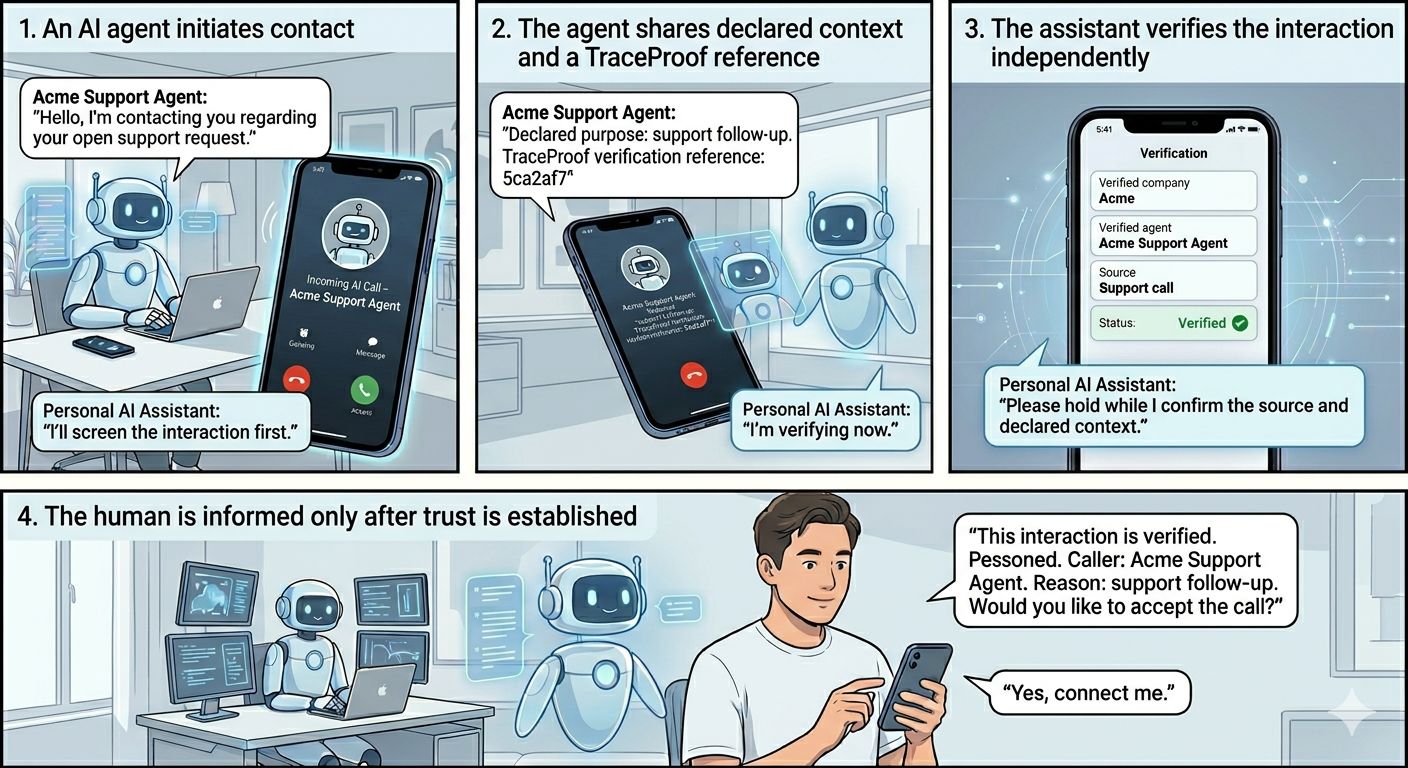
Let customers verify issuer, purpose, time, and protected message before engaging with AI-led calls, emails, chats, or service updates.Give automated communication an independent check.
Payment, supplier, and AP instructionsPayments and supplier changes
Attach a verifiable reference to supplier changes, invoice requests, bank-detail updates, or urgent payment instructions before money moves.Reduce risk before sensitive actions.
Customer support and account communicationsSupport and account updates
Make refunds, account access messages, identity checks, case updates, and support follow-ups easier for customers to verify.Help customers verify real communication.
Operator-led message protection
Allow support, finance, account, and operations teams to protect sensitive messages and attachments from supported tools. Gmail and Outlook are available now, with more channels and platforms planned.Protected messages from supported tools.
How TraceProof works
A proof trail that travels with the communicationHow TraceProof works
TraceProof creates a communication trace, adds protected message and attachment proof records, and lets people, partners, or systems verify the trace independently before acting.Create a protected trace and let recipients check it.
1
Register approved issuersRegister approved sources
Companies define the senders, operators, agents, workflows, and systems allowed to create protected communication traces.Companies define who can issue protected traces.
2
Protect the communicationCreate a trace
TraceProof creates a public or private reference and binds issuer, purpose, time, trace status, message fingerprints, attachment fingerprints, and proof data to it.TraceProof creates a public or private reference.
3
Verify independently
Recipients, partners, employees, and connected systems check issuer, purpose, time, message match, attachment match, and private access when needed without TraceProof storing raw message bodies or files.Recipients use the reference to check before they trust it.
Proof without surveillance. TraceProof stores proof metadata and trace history, not the raw conversation. It can support multiple protected records over time, including updates, expiry, revocation, and supersession.
Who TraceProof helps
Built for issuers, recipients, and connected systemsWho TraceProof helps
TraceProof helps the organisation issuing the trace, the person receiving it, and the system that may need to check it before acting.For teams, recipients, and systems that need to check first.
For teams issuing sensitive communication
Add independent verification to sensitive messages, files, payment requests, workflow updates, AI-assisted communication, and system updates.Add verification to sensitive messages, files, workflows, and AI communication.
Manage approved sources, purposes, templates, lifecycle states, and trace settings from one organisation account.Manage approved sources and trace settings.
Create a Company AccountFor people receiving it
Check issuer, purpose, time, status, message match, and attachment match before responding or acting.Check issuer, status, message, and attachments before acting.
Private traces can require access codes, and proof history shows if communication is current, revoked, or superseded.Private traces can require access codes.
Create a User AccountFor systems checking it
Verify issuer, purpose, status, and integrity before a workflow continues.Check before a workflow continues.
Useful for partner, marketplace, platform, AI, and operational workflows.For partner, platform, and AI workflows.
Pricing
Simple pricing to get started
Choose a plan based on protected communication volume, trace usage, and agent count.Start small, then scale verification as usage grows.
Best place to start
Developer
Free
Testing and early integrations.
- 1,000 certified interactions / month
- ~16 protected conversations / day*
- 3 agents
Growth
$29 / month
Startups and early live use.
- 7,500 certified interactions / month
- ~125 protected conversations / day*
- 10 agents
Professional
Contact sales
Growing teams and multi-agent live use.
- 25,000 certified interactions / month
- ~417 protected conversations / day*
- 25 agents
Enterprise
Contact sales
Broader rollout and tailored for your needs.
- Tailored protected interactions
- Tailored protected conversations
- Tailored agents
Exact image checks are included in the same TraceProof verification plans.
Richer uploaded-image checks are available as an add-on where image integrity needs deeper comparison.
FAQ
Frequently asked questions
Answers to common questions about verification, privacy, content checks, and rollout.Quick answers before you start.
What is TraceProof?
TraceProof is an independent verification layer for sensitive communication. It helps recipients, partners, and systems check who issued a message, file, request, or workflow update, why it was sent, when it was protected, and whether protected messages or attachments still match before they act.
Does TraceProof store message content or files?
For communication traces, TraceProof stores proof metadata, not raw message bodies or raw attachments. Message and attachment checks use fingerprints so recipients can verify a match without TraceProof keeping the conversation or files.
Can TraceProof verify images or other content?
Yes. TraceProof can also support content verification where file or image integrity matters. The core communication trace remains focused on proof metadata, message fingerprints, attachment fingerprints, and verification before action.
Who can verify a TraceProof reference?
Customers, partners, employees, or connected systems can verify the trace they receive. In many flows, Company A issues the trace and Company B, the customer, or another system checks it independently before acting.
What does TraceProof verify?
TraceProof can verify issuer, declared purpose, source, time, trace status, protected message match, attachment match, and private access when needed.
Can teams use TraceProof without a full system integration?
Yes. TraceProof supports operator-led message protection for approved users working in supported tools such as Gmail and Outlook, with more channels and platforms planned. Admins configure allowed senders, profiles, purposes, templates, and trace settings. Operators can protect sensitive messages and attachments, then give recipients a TraceProof reference to verify independently. API integrations can be added later for automated or higher-volume workflows.
Can this work for agent-to-agent interactions?
Yes. The same verification model can support software agents and connected systems checking who issued an incoming communication, why it was sent, and whether protected messages or attachments match before a workflow continues.